Everything new at Usetix. Product updates, shipped in the open.
Sunday
New
Improved
Venue maps and seating plans, drawn like in Figma
The venue map and seating plan editors now take the whole window and work like Figma. Draw the room in real metres over a floor plan or let the AI draw the plan from a picture, bend rows into arcs and lock what should stay put.
Figma's keys and gestures: the V and H tools, ⇧1 to show everything, ⌥ to align, ⌥-drag to copy, a right-click menu and ? for every shortcut
Walls draw as rooms, bend into arcs and round their corners; positions and sizes in metres, with a scale for each venue map
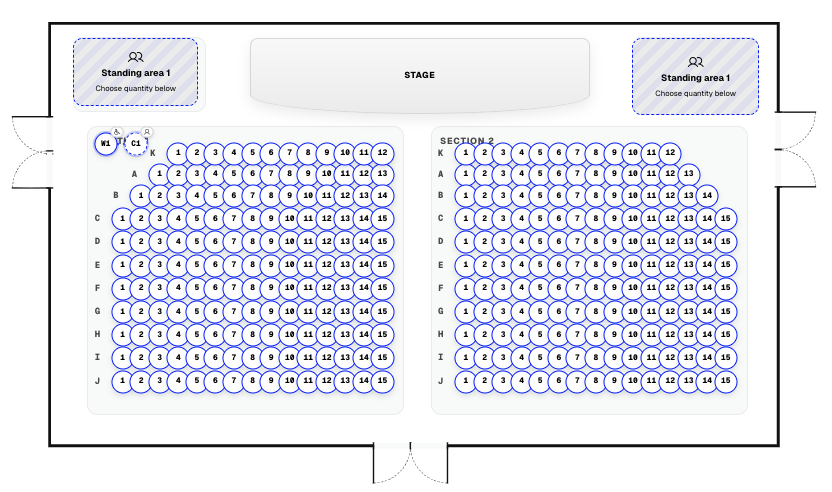
Doors open on one leaf, two or as a passage and are marked as entrance, exit or emergency exit; facilities such as the bar, toilets, cloakroom, box office, stairs, lift, pillars and a fixed stage show on every seating plan and in the shop
A floor plan picture under each level to trace over, scaled with two clicks
A venue map or seating plan from a picture or PDF: Usetix finds the seats itself and keeps their curves, and the AI names rows, zones and the stage
Rows bend into arcs, number in seven ways and carry their name at one end or both; kinds of place such as a loveseat or recliner have their own symbol on the plan, in the shop's legend and on the ticket
Lock what should stay put with ⇧⌘L, the lock or a right click; what comes from the venue map says so and links to it
The assistant opens beside the plan with ⌘J
Friday
Improved
Free seats as a list, PDFs that pass PDF/UA and legal texts in five languages
Buyers can choose seats from a list instead of the plan, every PDF passes the automated PDF/UA checks, and a payment that ran out can be tried again in one click. Your standard legal texts now also come in French, Spanish and Portuguese.
Seat map: the seat in focus or under the pointer is written out with its price class, and “Free seats as a list” offers every free seat as a checkbox by row, in step with the plan
Tickets, vouchers, invoices, exports and reports pass veraPDF's PDF/UA-1 checks: decoration marked as such, QR codes and links described, XMP metadata
Pictures in event descriptions and your shop's about text get descriptions too, with the AI suggestion
“Try again” on a cancelled or expired payment returns to the checkout with the same tickets and seats and the buyer's name and email
Standard imprint, privacy policy and terms in French, Spanish and Portuguese for shops in those languages
Image descriptions, tagged PDFs and more time to buy
Describe your images for screen readers, with a suggestion from the AI if you like. Tickets, vouchers and invoices now come as tagged PDFs, the seat map works with the arrow keys, and buyers get more time when they need it.
Event page, ticket design and shop settings: a description for every image (poster, photos, sponsor logos and banner); “Suggest” has the AI propose one in your shop's language for you to check
Tickets, vouchers, invoices and exports are printed by headless Chrome as tagged PDFs with headings, tables, language and title, and the ticket in its own fonts
The seat map is a single tab stop: the arrow keys move from seat to seat, and every seat names its price class
A minute before held seats run out, checkout says so and offers 10 more minutes, up to ten times; paying on Stripe's or PayPal's page now gets 30 minutes
Shops stay usable in Windows contrast themes: icons, buttons, switches and seats keep their shape
Without JavaScript, buyers can still choose tickets and check out
Your shop now tells screen readers what is happening, and checkout points to what is missing instead of locking the pay button. Plus a public accessibility statement and a list of every cookie your buyers get.
Every shop page has its own title, and after moving to another page the focus goes to its heading
Choosing tickets announces the ticket, the quantity and the new total
The pay button always works: a missing answer is pointed out beside its field, and a checkout the shop turns back opens with a linked list of what to fix
Your choice questions at checkout are standard dropdowns that work with arrow keys
Messages stay until closed, sale countdowns can be paused, and the focus outline stands out on any shop color
Order emails come as plain text too, name their language and have readable grey labels
New at usetix.io: the accessibility statement under the BFSG and the cookie list, both in the footer
See who changed what in your account: your team, your integrations and Usetix support, with the channel each change came through. Built with as little personal data as possible and kept for 12 months.
Settings → Activity: who did what and when, from team and access to events, tickets, refunds, promo codes and account settings
Each entry names the channel: dashboard, assistant, MCP, API or automation; account-wide API tokens show the token's name
Filter by person, area and period
Usetix support visits and changes appear in the log, and support can read it to help you faster
No IP addresses or buyer contact details, names never stored in an entry, entries deleted after 12 months
Sign-ins end after 90 days without use; AI app tool call records are deleted after 90 days
Give your shop its own look with six themes, your accent color and 35 fonts, tried live on your real shop before you save. Each event can wear a look of its own, and guest-list signup links ask exactly what you need.
Six themes, 35 self-hosted fonts and your accent color, freely combined
Look studio: your real shop as a live preview, with a dice for surprises, a desktop/phone switch and nothing saved until you say so
Each event can wear its own look; the event color also colors its PDF tickets and Wallet passes
Describe a mood and the AI assistant picks the look, also through MCP
Signup links ask for company, phone, companions' names and checkout questions as you choose; guests sign up once per event and can add companions later
Search in admin lists keeps its focus while you type
Write campaigns to the people who already bought tickets, right in Usetix. Segments come from your ticket data, emails come in five looks, and every campaign shows the revenue it brought in.
Dynamic segments with 22 rules that update themselves with every order
17 templates in five looks: Classic, Night, Poster, Letter and Elegant
Personal emails with first name, last event, city and discount codes
The AI assistant drafts a whole campaign from one sentence, also through MCP
Delivery, opens, clicks, orders and revenue per campaign; 2 cents per delivered email
Explain menu choices at checkout, set answer rules independently, and arrange the sections of your event page.
Required answers, completion after purchase, and the editing deadline are independent: require a menu choice at checkout and still allow changes until the deadline
Write your own information popup beside a checkout question; line breaks and blank lines keep menu descriptions readable
Drag event page sections into place, for example moving the gallery below the description; the order saves immediately and carries over when duplicating an event
Manage question details, answer rules, and section order through the AI assistant, MCP, or Admin API too
Monday
Improved
Fix
Customer order links and complete overviews
Find and share the buyer’s order page more easily, and see all records unless you explicitly choose a period.
Copy the customer order link directly from the admin order page; purchase confirmation emails include it too
Order and attendee exports, AI/MCP order lookups, the Admin API, and order webhooks include the same customer link
Period filters default to all time and no longer carry a previous page’s selection into another overview; the API uses the same default
Sunday
Fix
More reliable QR codes in PDFs
Ticket and voucher PDFs now render QR codes at their intended size with enough clear space around them.
Fixed clipped QR codes on ticket PDFs and voucher PDFs
Adjusted the ticket tear-off layout so the QR code fits correctly alongside sponsor artwork
Sunday
Improved
Fix
Clearer AI results and more reliable integrations
Integrations can distinguish failed actions from successful results more reliably, and interrupted event deliveries can recover automatically.
Invalid input and ambiguous lookups are returned as explicit AI/MCP tool errors; previews awaiting confirmation remain valid results
Webhook delivery recovers interrupted attempts and prevents concurrent workers from sending the same active attempt twice
Saturday
Improved
Clearer event management
Find sales, orders, guests, and open answers through a consistent event navigation, with focused pages for editing your event.
Separate editing pages for event details, the shop page, and attendee information
Consistent primary actions and menus across the dashboard and event administration
Hidden tickets now carry a visible badge directly in the admin ticket list
Friday
Improved
Fix
More reliable checkout and Meta connections
Payment retries preserve the existing purchase more reliably, and several connection and publishing issues in the Meta beta are fixed.
Stripe, PayPal, and seated checkout retries retain pending orders and reservations when a payment response is delayed or lost
Confirmation emails recover after temporary queue failures without undoing completed purchases
Promo code usage limits are enforced even when several buyers check out at the same time
Fixed completing a Meta connection with Instagram accounts and resuming Instagram processing without repeating an already published Facebook post
Thursday
New
Improved
Post-purchase event messages
Add an event-specific note for ticket holders and show it on completed order pages, confirmation emails, and guest-list deliveries.
Write and format the message in the event editor, AI assistant, Admin API, or CLI
Combined orders keep each message with its event so buyers always know what applies where
Later edits appear immediately on existing order pages; emails keep the version sent at delivery time
Wednesday
New
Improved
Post-purchase answers and customer follow-ups
Let group buyers complete required order- or attendee-level details after payment, set per-question deadlines, and follow up from an event worklist with a factual CRM interaction history.
Required questions can stay non-blocking at checkout and be completed from the existing buyer order page, with no guest accounts or attendee links
Open-answers worklist grouped by buyer, including missing people and fields, contact state, deadlines, and locked answers; cancelled admissions stay out
Read open answers and customer history, and log interactions through the AI assistant, MCP, or Admin API
Monday
New
Account-wide gift vouchers
Sell fixed, flexible, or promotional bonus vouchers in your shop, deliver branded PDFs and Apple Wallet passes, and accept partial balances across events with Stripe or PayPal for any remainder.
Pay 50, get 75 promotions with paid amount and bonus credit reported separately
Immediate, scheduled, or self-managed delivery with PDF, private link, and Apple Wallet
Partial and combined redemption, immutable ledger, refunds, imports, API, MCP, CLI, and webhooks
Create and manage paid Meta campaigns for an event directly in Usetix, with spend previews and explicit approval before anything goes live. This limited beta is enabled only for selected accounts.
Propose and adjust campaign copy, audience, schedule, and budget before approval
Pause, resume, and refresh campaigns while tracking status and current spend
Available through the dashboard, AI assistant, MCP, and Admin API for enabled accounts
Sunday
New
Improved
Marketing tracking, embeds, and shareable analytics
Connect your own Google, Meta, and TikTok tracking after explicit Marketing consent, embed the complete upcoming event directory, show sponsor artwork in the shop, and give partners expiring read-only analytics links or PDFs.
Consent-gated GA4, Google Ads, standalone Meta Pixel, and TikTok Pixel with ecommerce events
One iframe for every published, listed, upcoming event, plus sponsor banners and logos on event pages
Expiring and revocable analytics reports for partners through the dashboard, AI/MCP, Admin API, and CLI
Friday
New
Usetix CLI
Manage events and orders from the terminal with the open-source Usetix CLI. Get readable tables for daily work, stable output for scripts and coding agents, and direct access to every existing Admin API endpoint.
Install with Homebrew, Go, or a prebuilt binary for macOS, Linux, and Windows
Typed event and order commands with secure token storage, profiles, and explicit confirmation for destructive actions
Cursor pagination, stable JSON modes, and usetix api for the complete Admin API
Add complimentary named guests without a fake 0€ checkout — they take real inventory and show up at the door by name. Choose whether you absorb the Usetix fee or pass it to buyers, then add your own extra fee if you want one.
Named guest-list parties for GA and seated events, with door search and walk-ins
Absorb the Usetix fee or pass it to buyers; add a fixed fee, a percentage, or both
Account defaults with per-event overrides; dashboard, AI, MCP, and Admin API
Usetix Credit creates one reusable balance for paid services inside Usetix. It starts by covering platform fees on PayPal sales and lays the groundwork for future services such as Instagram advertising and newsletter sendouts.
One pay-as-you-go balance designed for multiple Usetix services
Manual or automatic top-ups with a clear, auditable usage history
PayPal platform fees are the first use; more value-added services can follow
Show only an event's start when the end time is not useful to guests. Usetix keeps an internal end time for scanners, calendars, and event status while hiding it in the shop and ticket embed.
Leave the end time empty when creating an event to show only its start
Show or hide the end time later from the event settings
Use the same control through AI, MCP, and the authenticated Admin API
Thursday
New
Improved
Separate doors time
Set when guests may enter separately from the event start. Usetix shows both times in the shop and on tickets, so arrival and showtime stay clear.
Optional doors time in event settings
Shown in the shop, ticket PDFs, and wallet passes
Available through the AI assistant, MCP, and event APIs
Wednesday
New
Improved
Unlisted events
Keep a published event out of public shop overviews while its direct link and checkout stay live. Ideal for invitations, private presales, and partner campaigns.
List or unlist an event from its settings
Direct event links and checkout keep working
The same control is available through AI, MCP, and the authenticated Admin API
Friday
New
Shop Analytics
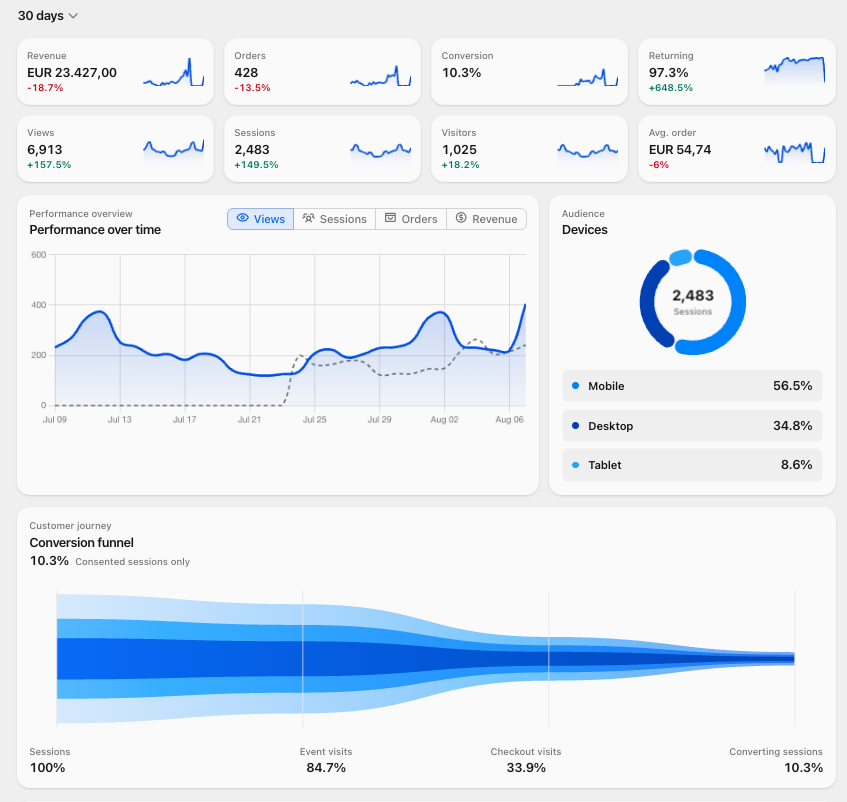
See what actually sells tickets: revenue, conversion, first-touch sources, a funnel, devices, top events, CSV export, AI reports, and Live View with active sessions on a globe. Consent-based, built for organizers.
KPIs with period-over-period change and sparklines
Guests pick their own seat. Build the hall once on a map (rows, tables, zones, standing, wheelchair places), then sell reserved seating without the spreadsheet chaos.
Drop a compact ticket box on your own event website. Buyers pick tickets there, then continue through hosted Usetix checkout for payment, invoices, delivery, and check-in.
A hosted MCP server for external AI clients, a much stronger offline scanner, real XLSX exports, human-readable ticket codes, better German options, and a long list of admin quality-of-life fixes.
Percentage or fixed discounts buyers apply at checkout. Cap totals, scope to events, and share with `?promo=` links for newsletters and influencer tracking.
Operate in EUR, USD, GBP, CHF, or CAD from your Stripe Connect default currency. Customer-invoice VAT got per-country defaults and per-event overrides.
Refund any partial amount on Stripe or PayPal in two clicks. Wire a PayPal webhook and refunds or disputes made in PayPal flow back into Usetix automatically.
Partial refunds on Stripe and PayPal
PayPal-side refunds sync to order status, stock, and invoices
Ask anything at checkout (dietary needs, attendee names, t-shirt sizes), per order or per attendee. Answers land in the dashboard, CSV exports, and webhooks.
Magic links and passkeys for sign-in, a completely rebuilt ticket shop, event pages with live countdowns, drag-and-drop ticket sorting, and dozens of polish improvements.
Real-time notifications when orders complete, refund, or cancel, and when events publish or unpublish. Connect CRM, accounting, or any endpoint that accepts webhooks.
Over 100 improvements in three weeks: a redesigned shop experience, Apple Wallet push notifications, smarter checkout, purchase recovery, and automated database backups.
Cmd/Ctrl+K search across orders, customers, and events; a redesigned dashboard; system-aware dark mode; smoother checkout; and a clearer settings area.